
Swearnet.com Incorporated Frequently Asked Questions
Version 1.8 : November 20, 2025
Includes App Updates and TPB+ Account Activation Instructions
Frequently Asked Questions
Click to expand:
I wanna send a greasy package for the Boys to open on Mailbag. What’s your address?
The address to send gifts to the Boys to be opened on Mailbag is:
  Attn: Mailbag
  Swearnet.com Incorporated
  PO Box 38072 Burnside
  Dartmouth NS
  B3B 1X2
  CANADA
IMPORTANT!
- If sending from outside of Canada, please mark it as ‘GIFT’ because we won’t be fucking paying the import duty and taxes!
- We find that Canada customs are inspecting packages more frequently these days. Please be careful about what you're sending.
- Please DO NOT send perishable goods. Packages take many weeks in transit and could sit for many more weeks before being opened on the show. If your parcel contains food or drink, please indicate it on the package - we don’t want dirty fuckin’ garbage juice all over the studio, it gives the kitties the shits.
- We receive a shit-ton of goodies for Mailbag so please be patient if you send something in. We WILL get to your parcel!
I'm not able to sign into Swearnet. What happened?
If you see a circle constantly spinning in your app, or your app just crashes, then you're using the older version of the app. Please continue reading below for details on how to update to the latest version of the app.
Swearnet.com has moved to TPB+. After July 14, 2025, Swearnet and the TPB Swearnet App stopped receiving new content updates. On November 1, 2025 we shut down the Swearnet website and original versions of the app entirely. We've left our website open to communicate important information to Swearnet customers still making their move to TPB+.
Why are my Swearnet email and password not accepted on TPB+?
- Privacy and technical restrictions prevented us from transferring passwords from Swearnet to TPB+. Swearnet passwords will not work on TPB+, and vice versa.
- Passwords on each system can and often will be different. For example, you can't perform a password reset on Swearnet and expect that password to work on TPB+.
- User databases for TPB+ and Swearnet are completely independent, meaning your Swearnet email address may not yet be present on TPB+.
- Wherever possible, TPB+ has credited Swearnet purchases. For active Stripe subscribers, membership end dates and transactional purchases (Digital Collection, BATS movie) should be present on TPB+, however, mobile subscribers are required to migrate using the TPB+ app please follow these instructions.
- Emails from active Stripe subscriptions were transferred to TPB+, but not for subscriptions that had ended. For example, if your subscription to Swearnet expired or was cancelled before July 8, 2025, you'll need to start a new subscription on TPB+.
What do I do if I had an active membership subscription or Digital Store purchase that is not showing up on my TPB+ account?
- For active Stripe subscribers, membership end dates and transactional purchases (Digital Collection, BATS movie) should be present on TPB+. Make sure you are using the correct email address, generally it is the same email that you used on Swearnet.
- For mobile app subscribers, you are required to migrate using the TPB+ app click for details.
- If your subscription and/or purchases (Digital Collection & BATS Movie) were not migrated over to TPB+, please contact us
My Swearnet Android app constantly spins, crashes, or says "Please update to the latest version of the Swearnet app.". How do I fix this?
You'll need to UNINSTALL and RE-INSTALL the app.
On your Android device, please do the following:
- UNINSTALL the app
- Press and hold the TPB App icon
- Tap "Uninstall" from the pop-up menu
- Confirm the uninstall by answering "Yes"
- RE-INSTALL the app
- Visit the TPB+ App in the Google Play Store for Android and Android TV
- Tap INSTALL
My TPB Apple app won't let me update to the latest version. How do I fix this?
You may be seeing "Please update to the latest version of the Swearnet app." and are unable to, or you may be stuck on a version lower than 9.101.1
If your Apple iOS/iPad/tvOS app is not updating, you'll need to UNINSTALL and RE-INSTALL:
- UNINSTALL the app
- Locate the app's icon on your Home Screen or in the App Library
- Touch and hold the icon until a menu appears
- Select "Remove App" and then choose "Delete App" from the subsequent menu
- Tap "Delete" to confirm that you want to delete the app and all data
- RE-INSTALL the app
- Visit the TPB+ App in the Apple App Store
- Tap INSTALL
Where do I find the TPB+ Apps?
You'll find our apps in these app stores:- Apple App Store for iPhone, iPad iPad Touch and Apple TV requires iOS/iPadOS/tvOS 15.0 or later. Latest Version 9.101.1
- Google Play Store for Android and Android TV requires Android 5 and up. Latest Version 9.104.2
- Roku TV and Roku Devices Latest Version 9.101.1
- Amazon Fire TV</details Current Version 9.002.1
Who do I contact if I still have an issue?
- If you have an issue with migrating your account or subscription from Swearnet to TPB+, use the Contact Technical Support form
- For assistance once you're on TPB+, please search the TPB+ knowledge base and if you still require further assistance, contact TPB+ support
How do I move my subscription and account over to TPB+ ?
The method for activating your account on TPB+ depends on your most recent Swearnet subscription:
▹ Active Stripe and PayPal subscribers have had their emails imported into TPB+ and their Swearnet subscriptions cancelled. For your first time signing into TPB+, please enter your Swearnet email address on TPB+ Reset Password form. If your email address is found on TPB+, we will send you an email with a special link to reset your password. Check your spam or junk folder if you don’t see the email. Please note that you will only be sent an email if your email address is recognized by TPB+. If you do not receive an email, and you were an active Stripe or PayPal subscriber on Swearnet prior to mid July, please sign into Swearnet.com and provide details on our Technical Support form. Users with new or renewed subscriptions between July 8 and 19 may need technical support intervention.
▹ Active Mobile subscribers paying through our Apple, Google or Roku apps, will need to ensure the corresponding TPB+ app is fully updated, and use the Restore purchase link near the bottom of the app’s home page. For example, if you are currently subscribed with Google Play, you’ll need to be signed into your Google Play payment account on an Android device for ‘Restore purchase’ link to work. After you tap the ‘Restore purchase’, you will be prompted to create an account on TPB+. Detailed instructions can be found in the next section.
▹ If you’re not one of the active subscribers listed above, you’ll have to create a new account on TrailerParkBoysPlus.com (TPB+).
I’m subscribed through the Swearnet mobile app. How do I get on TPB+ ?
Detailed Instructions for Mobile App Subscribers
These instructions are for customers who have active paid subscriptions with Apple, Google Play or Roku. ‘Active paid subscription’ meaning that you’re currently paying one of these companies to access Swearnet. You will be creating your account and migrating your existing subscription to TPB+ using the ‘Trailer Park Boys Plus’ app. Find your subscription service below and follow the steps:
FOR APPLE SUBSCRIBERS:
-
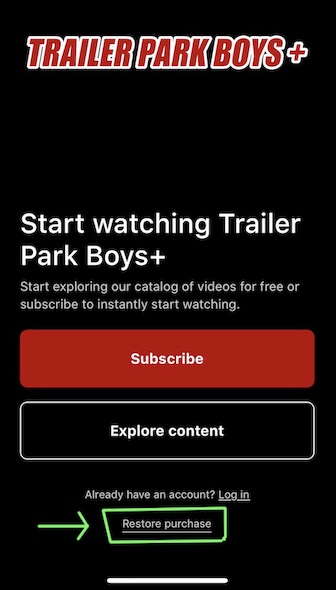
On your iPhone/iPad device, please install the Trailer Park Boys + app from the Apple App store if not already updated. NOTE: You may need to uninstall the current version of the app and re-install the updated version if the home screen does not look like the image below. Current version is 9.101.1 and can be checked at the bottom of the ‘Settings’ screen.
-
OPTIONAL: Still on your iOS device, you may want to ensure that the account that made the Swearnet subscription is connected to Apple. Transferring your Swearnet account and purchases only works if you’re signed in with the same Apple account subscribed to Swearnet. For assistance signing in or verifying, see this Apple article Sign in to your Apple Account
-
Open the TPB+ app. The first screen should look like the image below. Do not attempt to ‘Subscribe’ or to ‘Log in’ at this time.
-
At the bottom of the TPB+ app’s main screen will be a ‘Restore purchase’ link as shown in the image below. You’ll need to tap that and follow the instructions, which will both register your purchases on TPB+ and allow you to create an account.
-
If receipts are successfully retrieved and verified, you will be prompted to create your account on TPB+.
Trailer Park Boys Plus Mobile App Start Screen
FOR GOOGLE PLAY SUBSCRIBERS:
-
On your Android device, please install the Trailer Park Boys + app from the Google Play store if not already updated. NOTE: You may need to uninstall the current version of the app and re-install the updated version it if the home screen does not look similar to the image above. The version should be 9.101.1 or 9.104.2 and can be checked at the bottom of the ‘Settings’ screen.
-
OPTIONAL: Still on your Android device, you may want to ensure that the account that created the Swearnet subscription is connected to Google. Transferring your Swearnet account and purchases only works if you’re signed in with the same Google account subscribed to Swearnet. For assistance in selecting the correct Google Play account, see this Google article How to add & use accounts in the Google Play Store on your device
-
Open the TPB+ app. The first screen should look like the image above. Do not attempt to ‘Subscribe’ or to ‘Log in’ at this time.
-
At the bottom of the TPB+ app’s main screen will be a ‘Restore purchase’ link as shown in the image above. You’ll need to tap that and follow the instructions, which will both register your purchases on TPB+ and allow you to create an account.
-
If receipts are successfully retrieved and verified, you will be prompted to create your account on TPB+.
FOR ROKU SUBSCRIBERS:
-
On your Roku device, please install the updated Trailer Park Boys + app if not already updated. NOTE: You may need to uninstall the current version of the app and re-install the latest version. You can uninstall and/or check versions by pressing the * (star/asterisk) button on your Roku remote while the app is selected on Roku’s home screen. Current version is 9.101.1.
-
OPTIONAL: Still on your Roku device, you may want to ensure that account signed in matches the account that created the Roku subscription (the one being being billed). Transferring your Swearnet account and purchases only works if you’re signed in with the same Roku account subscribed to Swearnet. To verify, select Settings > System > About. Your email address will appear at the bottom of the screen. If it does not match, please try your other Roku devices.
-
Open the TPB+ app. Do not attempt to Subscribe or Log in at this time.
-
At the bottom of the TPB+ app’s main screen will be a ‘Restore purchase’ link. You’ll need to tap that and follow the instructions, which will both register your purchases on TPB+ and allow you to create an account.
-
If receipts are successfully retrieved and verified, you will be prompted to create your account on TPB+.


